
Julio Police Cars
Play Count0
Published2020-06-30
Supported DevicesPC
CategoryAdventure & RPG
Rating★★★★★5.0Rate this game
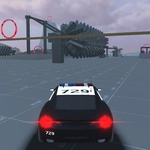
📝Julio Police Cars Overview
Slide behind the wheel of a police cruiser, hit the sirens, and tear through city streets at full throttle.
💬What is Julio Police Cars?
Julio Police Cars drops you into a fully 3D city with a patrol car and zero instructions beyond the key bindings. That's not a complaint—it's the whole point. You'll figure out pretty quickly that the handbrake is your best friend, especially when you're trying to slide around a corner at speed without wrapping yourself around a lamppost. The boost on Left Shift feels appropriately irresponsible, and the camera key (C) becomes essential once you realize the default chase cam can't see around tight alleyways.
The police lights are a nice touch. Hit E and the whole block lights up red and blue, which does absolutely nothing for gameplay but makes every chase feel ten times more official. I kept flicking them on before flying off a ramp or cutting through a park. The 'unstuck' key (G) is a lifesaver too—because yes, you will wedge the car between a dumpster and a wall within the first five minutes.
Don't expect missions or a story. This is a sandbox driving toy with a police skin. The city is big enough to get lost in, and the physics are arcade-y enough that you'll forgive the occasional janky collision. If you've ever wanted to just drive a cop car around and not worry about tickets, this scratches that itch perfectly.
👥How to Play Julio Police Cars
• WASD or arrow keys to drive
• Space key to handbrake
• Left Shift to boost car
• G key to unstuck car
• R key to reset scene
• C key to change view (camera)
• E key to turn on police lights
✨Game Tips
Tap the handbrake (Space) instead of holding it — short taps let you rotate the car without killing all your momentum.
Use the boost (Shift) on straightaways, not just before a turn; it's easy to overshoot and spin out.
Switch camera with C when reversing or squeezing through narrow gaps; the hood view helps a surprising amount.
If you get stuck on a curb or fence, mash G before hitting R — the unstuck usually saves your position and speed.
Turn on the police lights (E) for no reason other than it makes every drive feel cooler, especially at night if the map has a day cycle.
Don't be afraid to go off-road; the car handles grass and dirt better than you'd think, and it's a great shortcut.
🔧FAQ
Q: Is Julio Police Cars free to play?
A: Yes, it's completely free in your browser with no paywalls or hidden fees.
Q: Do I need to download anything to play Julio Police Cars?
A: No downloads needed—just open the page and the game runs instantly in HTML5.
Q: Can I play Julio Police Cars on mobile?
A: The desktop version uses keyboard controls; mobile support depends on the site, but touch controls may be available.
Q: What are the controls for Julio Police Cars?
A: Use WASD or arrow keys to drive, Space for handbrake, Shift to boost, E for lights, and C to change camera.
Q: Is there a mission or goal in Julio Police Cars?
A: There's no linear story; it's an open sandbox where you drive a police car freely around a 3D city.
Q: Why does my car get stuck sometimes?
A: Collisions can wedge the car in tight spots—press G to unstuck it or R to reset the scene.