
K-Games Challenge
Play Count0
Published2021-12-01
Supported DevicesPC + Mobile
CategoryAdventure & RPG
Rating★★★★★5.0Rate this game
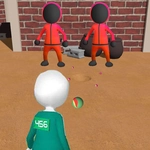
📝K-Games Challenge Overview
Tap, slide, and pray as K-Games Challenge hurls spinning blades, crumbling tiles, and hairpin turns your way.
💬What is K-Games Challenge?
I fired up K-Games Challenge expecting another throwaway 3D runner, but the second I tapped to jump over a chasm and slid under a low ceiling in the same breath, I knew this one had teeth. The premise is simple: you steer a little blocky avatar through increasingly sadistic obstacle courses, tapping to leap and sliding your finger to swerve. There's no tutorial beyond a quick prompt, which is perfect — you learn by dying, and you'll die a lot. The camera hugs close behind you, so every turn feels personal, like the level designer is personally trying to make you flinch.
What kept me coming back wasn't just the tight controls — it's how the game reads your timing. I'd swear the obstacles shift ever so slightly when you hesitate. Cracked floor tiles collapse after half a second, rotating blades speed up when you're near, and narrow ledges demand pixel-perfect slides. There are no checkpoints in the later stages, which sounds brutal but works because runs are so short (usually under two minutes). You'll grind a single segment twenty times, then suddenly nail a sequence and feel like a speedrunner. The flat-shaded polygonal art style looks clean, and the color-coded dangers (red = instant death, yellow = risky but passable) become second nature. The audio is minimalist but effective — a sharp whoosh when you slide, a dull thud when you clip a wall, and a satisfying chime for each coin collected. There's also a global leaderboard if you're competitive, though I mostly ignored it trying to beat my own best time. If you enjoy games like Geometry Dash's rhythm or Crossy Road's one-more-try loop, K-Games Challenge scratches that same itch without needing to install anything.
👥How to Play K-Games Challenge
Tap and slide to move
✨Game Tips
Master the art of the early slide: it kills downward momentum, letting you land on smaller platforms without bouncing off.
Coin placement is a breadcrumb trail — the developers use them to hint at the safest path through each section.
Don't fight the camera; keep your thumb movements smooth and small, because jerky swipes spin you around too fast.
For rotating blades, time your jump just as the blade passes its lowest point, then slide immediately to clear the next gap.
Failed a section? Study where the ash particles appear — that's where the game wants you to land, not necessarily where you think.
🔧FAQ
Q: Is K-Games Challenge free to play?
A: Yes, the game is completely free to play in your browser, with no hidden paywalls or premium levels.
Q: Can I play K-Games Challenge on my phone?
A: Yes, it works on most mobile browsers. The tap-and-slide controls are designed for touchscreens, so phone play feels natural.
Q: Do I need to download anything to start playing?
A: No downloads or installs are required. Just open the game page in any modern browser and it runs instantly.
Q: What are the controls in K-Games Challenge?
A: Tap anywhere on the screen to jump, and slide your finger left or right to steer around obstacles and corners.
Q: Is there a way to save my progress or unlock new levels?
A: Your best times are saved locally in your browser, but there's no account system. Levels unlock sequentially as you beat them.
Q: Does K-Games Challenge have multiplayer or leaderboards?
A: It's a single-player experience, but there's a global leaderboard where you can compare your best completion times with others.