
Keyton
Play Count0
Published2022-01-05
Supported DevicesPC + Mobile
CategoryAdventure & RPG
Rating★★★★★5.0Rate this game
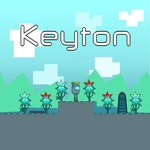
📝Keyton Overview
Every leap in Keyton feels like a tiny act of faith—miss, and the void below doesn't care how far you've come.
💬What is Keyton?
The first thing you notice about Keyton is that the platforms don't line up the way your brain expects. I spent my first few minutes falling into the same gap twice because the double jump fires a hair later than it should. That's not a complaint—it's the game's rhythm. You need to stop fighting it.
Movement is simple: WASD or arrows, with W/Up twice for the double jump. But "simple" hides how much you'll have to earn each ledge. Single jumps get you across basic pits; the double jump is what separates a clean run from a frustrated restart. I found myself counting the beats between the first and second press out loud. When you nail it, Keyton feels like parkour. When you don't, you'll swear the character has lead shoes.
Visually it's clean enough to read threats quickly, which matters because some jumps require you to already be angling toward the next platform before you land. There's no hand-holding, so you'll learn by dying. That's fine. Each run is short enough that "just one more try" becomes a loop. If you're the type who likes platformers with a mean streak, this one scratches that itch without needing a controller.
👥How to Play Keyton
Use "WASD" pr arrow keys for movement.
Use "W" or "Up Arrow" key twice for double jump.
✨Game Tips
Practice the double jump on flat ground before any serious run—timing the second press is everything.
Look for landing spots before you jump; mid-air course corrections are limited.
Don't hold W or Up while airborne if you only need a single jump; accidental double jumps kill runs.
Use the double jump late rather than early to squeeze more distance over wide gaps.
Restart intentionally after learning a section—it builds muscle memory faster than pushing through.
🔧FAQ
Q: Is Keyton free to play?
A: Yes, Keyton is completely free in your browser—no paywalls or hidden fees.
Q: Can I play Keyton on mobile?
A: Keyton works on mobile browsers, but a physical keyboard gives you much better jump control.
Q: Do I need to download Keyton?
A: No download needed. It runs as HTML5, so just open the page and start playing.
Q: What are the controls for Keyton?
A: Use WASD or arrow keys to move. Press W or Up twice for a double jump.
Q: Does Keyton support gamepads?
A: It's designed for keyboard, but some browsers let USB controllers map to arrows and W.
Q: Why does my character keep falling after the second jump?
A: The double jump has a slight delay—press the second jump a moment after the first, not instantly.