
Kuma Bear
Play Count0
Published2023-01-03
Supported DevicesPC + Mobile
CategoryAdventure & RPG
Rating★★★★★5.0Rate this game
📝Kuma Bear Overview
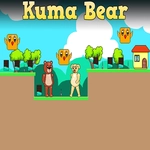
Guide a chubby bear through misty forest platforms and double-jump across bottomless pits in this bite-sized platforming adventure.
💬What is Kuma Bear?
A bear that double-jumps shouldn't feel believable, but here we are. Kuma Bear doesn't waste time on story or menus—it just drops you into a forest path and asks you not to fall. Movement is WASD or arrows, and the double jump is mapped to a second press of W or Up. What matters is timing. A second jump too early gives you a bit more height; too late and you're already dipping, which can still save a short gap if you're quick. That tiny timing window is where the game lives.
The stages are compact side-scrolling runs with wooden ledges, floating stone platforms, and a few too many bottomless pits. You won't fight anything, there are no enemies, and the only way to fail is to miss a jump. I kept losing at one stretch where three small platforms hover over a cliff. The instinct is to hammer the jump key, but it actually works better to let the bear's weight settle for half a beat before the second hop. Once that clicks, the whole game opens up.
It's short. It's stubborn. And weirdly, that one-more-try pull is stronger than a lot of bigger platformers I've played. If you want a quick break that's just a bear, some gaps, and your own reflexes, Kuma Bear scratches that itch without asking for your email or ten minutes of tutorial.
👥How to Play Kuma Bear
Use "WASD" or "Arrow" keys for the player's movement.
Use "W" or "Up" arrow key twice for double jump.
✨Game Tips
Master the double jump early. The second press works even if your first jump already left a ledge.
Let go of movement keys mid-jump to cut your arc short for landing on small platforms.
Use the double jump to correct mistimed leaps, not just to gain extra height.
Don't hold forward blindly. Short hops and careful landings beat raw speed.
Pause on edges to line up your jump—momentum isn't your friend in tight platform sections.
If you keep overshooting, tap the second jump a bit later to stall your fall.
🔧FAQ
Q: Is Kuma Bear free to play?
A: Yes, it runs free in your browser with no download or sign-up required.
Q: Can I play Kuma Bear on mobile?
A: Touch controls are not officially supported. A keyboard is recommended for the double-jump timing.
Q: Do I need to download anything to play Kuma Bear?
A: No. It loads instantly as an HTML5 game in any modern browser.
Q: What are the movement controls for Kuma Bear?
A: Use WASD or the arrow keys to move. Press W or the Up arrow twice to double-jump.
Q: Is Kuma Bear multiplayer?
A: No, it's a single-player platformer. Only one bear, one set of jumps.
Q: Does Kuma Bear save my progress?
A: Typically not. It's a short session-based game, so expect to restart from the beginning if you refresh.