
Miami Super Drive
Play Count0
Published2021-03-02
Supported DevicesPC
CategoryAdventure & RPG
Rating★★★★★5.0Rate this game
📝Miami Super Drive Overview
Cruise neon-lit streets, dodge traffic, and see how long you can keep a muscle car shiny side up in this sun-soaked joyride.
💬What is Miami Super Drive?
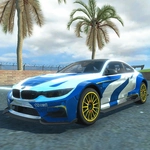
Miami Super Drive drops you behind the wheel of a surprisingly twitchy sports car on a looping stretch of palm-lined asphalt. It's not a full open-world map, but the city block feels alive with slow-moving sedans, sudden lane-changers, and the occasional taxi that brakes for no reason. I kept catching myself leaning into turns like that would actually help the physics.
The handling is arcade-simple but has just enough weight to punish you for going full throttle into a corner. You'll learn to feather WASD around sweeping bends, tap space for a controlled drift-ish slowdown, and switch cameras with C when the default view hides an oncoming truck. One time I clipped a curb at 90 mph, spun across three lanes, and somehow landed facing the right direction—pure Miami magic. Your only real goal is to survive as long as possible without wrecking, which turns into a surprisingly tense high-score chase.
There's no upgrade shop or story cutscene, and that's fine. It's the kind of game you open for five minutes and accidentally play for forty. The sun glare off the windshield, the faint tire squeal when you oversteer, the way traffic clusters near intersections—it all sells the fantasy of a reckless afternoon in South Beach without leaving your browser.
👥How to Play Miami Super Drive
WASD - Drive. Space - Brake. C - Change camera.
✨Game Tips
Tap space lightly instead of holding it—full brake just locks the wheels and sends you into a fishtail.
Switch to the hood camera with C for tighter traffic gaps; the third-person view hides cars on your left.
Stick to the middle lane when you can, but don't camp there—AI drivers have a habit of drifting across lanes without signaling.
Use short bursts of throttle on long straightaways; the car gets floaty above 120 mph and a tiny bump will launch you.
If you start spinning, let go of all controls and pray the car settles before it hits a palm tree because inputs only make it worse.
Traffic spawns thicker after the first minute, so don't get cocky early—keep a mental note of where the last three near-misses happened.
🔧FAQ
Q: Is Miami Super Drive free to play?
A: Yes, it's completely free in your browser with no paywalls or premium cars.
Q: Do I need to download anything to play Miami Super Drive?
A: No download needed. It runs on HTML5 right in your web browser.
Q: Can I play Miami Super Drive on my phone?
A: It works on mobile browsers, though the touch controls feel a bit less precise than keyboard driving.
Q: What are the controls for Miami Super Drive?
A: Use WASD or arrow keys to drive, Space to brake, and C to switch camera angles.
Q: Does Miami Super Drive have multiple game modes?
A: No, it's one endless survival drive mode—just keep going and beat your best distance.
Q: Why does my car spin out so easily in Miami Super Drive?
A: The handling is deliberately loose; brake before turns, not during them, and avoid sharp steering at high speed.