
Motorbike Simulator
Play Count0
Published2020-01-30
Supported DevicesPC
CategoryAdventure & RPG
Rating★★★★★5.0Rate this game
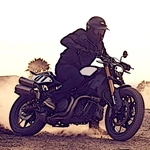
📝Motorbike Simulator Overview
Twist the throttle, lean into corners, and hit the nitrous—this motorbike sim gives you a full open 3D world to explore on two wheels.
💬What is Motorbike Simulator?
There's something weirdly addictive about a motorbike that actually tips over when you grab too much front brake. Motorbike Simulator doesn't hold your hand. You'll stall on hills, slide out on gravel, and faceplant into guardrails until you learn to respect the throttle. The open 3D map throws a mix of city blocks, open highways, and dirt trails at you, and each surface changes how the bike grips.
The controls are simple but deep: WASD or arrows to move, space for the handbrake (yes, you can drift a bike with it), Shift for a nitrous boost that's perfect for clearing jumps, and C swaps between first-person, chase, and cinematic cameras. R resets the whole scene, G just respawns the bike, and E flips on police lights—because why not? I spent twenty minutes just doing wheelies past traffic and seeing how long I could hold one before the front wheel slammed down.
What keeps me coming back is the physics. Hit a curb at speed and you'll actually feel the rear kick out. Land a jump slightly off-axis and you'll wobble until you either correct or high-side. It's not a hardcore sim like Ride, but it's way more involving than arcade racers. If you're looking for a motorbike sandbox that rewards practice, this is the one to boot up between classes.
👥How to Play Motorbike Simulator
Arrow keys or WASD keys to drive
• Space bar to handbrake
• C key to change view (camera)
• Shift key to boost bike
• R key to reset scene
• G key to reset bike
• E key to turn on police lights
• X to hide instructions
• T
✨Game Tips
Feather the throttle on dirt roads—full gas just spins the rear and dumps you.
Use the handbrake (Space) before tight corners to swing the rear around.
Tap Shift on long straights for a speed boost, but save it for when the road is clear.
Press C to switch cameras; first-person makes jumps feel twice as scary.
If you get stuck or flip, hit G to reset the bike without reloading the whole map.
Turn on police lights with E and pretend you're chasing a ghost rider.
🔧FAQ
Q: Is Motorbike Simulator free to play?
A: Yes, it runs right in your browser at no cost. No hidden fees or premium features.
Q: Can I play Motorbike Simulator on my phone?
A: The game uses keyboard controls, so it's best on a desktop or laptop. Mobile touch controls aren't supported.
Q: Do I need to download anything to play?
A: No download needed. Just open the page and the bike loads instantly in HTML5.
Q: What are the controls for Motorbike Simulator?
A: Use WASD or arrow keys to drive, Space for handbrake, Shift for boost, C for camera, R to reset scene, G to reset bike, E for police lights.
Q: How do I reset the bike if I crash?
A: Press G to respawn the bike at the same spot, or R to reset the entire scene if the map is messed up.
Q: Does Motorbike Simulator have different bikes or upgrades?
A: The base game focuses on one bike in an open map. No upgrades or unlockables, but the physics are deep enough to keep you busy.