
Noob Steve Parkour
Play Count0
Published2022-10-31
Supported DevicesPC + Mobile
CategoryAdventure & RPG
Rating★★★★★5.0Rate this game
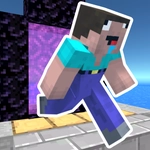
📝Noob Steve Parkour Overview
Dodge lava, sprint over crumbling blocks, and chain jump after jump as Noob Steve in a parkour gauntlet that resets you in seconds.
💬What is Noob Steve Parkour?
Noob Steve Parkour drops you into a blocky first-person obstacle course where one wrong step means a long drop into the void. You're controlling Steve, the default Minecraft skin, but this isn't about mining or crafting — it's pure movement. WASD to run, mouse to look, space to jump. That's it. The challenge comes from timing and precision, not complicated controls.
I spent a solid twenty minutes stuck on a section where you have to jump onto a slab that's barely wider than Steve's foot, then immediately turn 90 degrees mid-air to reach the next platform. The first few attempts I overcorrected and sailed right past the edge. The moment I finally landed it, my hands were sweating and I actually leaned forward in my chair. Checkpoints are generous, so you're never sent back too far, but each section still feels earned. The music is minimal, mostly ambient, so you'll hear the wind and your own footsteps, which somehow makes every near-miss feel more intense.
It's not a revolutionary parkour game, but it's a solid time-waster if you like precision platforming. The blocky aesthetic feels familiar and the physics are predictable — your jumps are consistent, which means every death is your fault, not the game's. If that sounds like a backhanded compliment, it's the highest praise a parkour game can get. Expect to curse, laugh at your own mistakes, and then click respawn one more time.
👥How to Play Noob Steve Parkour
Mouse or right joystick - Look around, WASD or left joystick - Movement, Space - Jump, ESC Key - Pause
✨Game Tips
Treat every jump as a commitment: release W right before you leave the ground or you'll drift forward into the next gap.
Look down at your feet before a tight landing — judging distance from first-person view is easier when you see the edge.
Don't hold space; a quick tap gives you more control over jump height.
Use the pause (ESC) when you're tilting your camera mid-air to plan the next move without pressure.
If you keep dying on the same block, try moving your mouse less and strafing with A/D instead.
Memorize the checkpoint locations; sometimes skipping a risky shortcut and taking the longer route saves time overall.
🔧FAQ
Q: Is Noob Steve Parkour free to play?
A: Yes, it's completely free in your browser. No hidden fees or premium unlocks.
Q: Can I play Noob Steve Parkour on my phone?
A: The game is built for keyboard and mouse, but some mobile browsers support touch controls. Desktop is recommended.
Q: Do I need to download Noob Steve Parkour?
A: No download needed. The game runs instantly as an HTML5 title on any modern browser.
Q: Why do I keep falling off edges in Noob Steve Parkour?
A: Most falls happen because you're holding forward while jumping. Release W just before landing to stop sliding.
Q: Can I save my progress in Noob Steve Parkour?
A: The game uses checkpoints, so you won't lose all progress. Closing the tab resets your run, though.
Q: Is Noob Steve Parkour safe for kids?
A: Yes, there's no violence or inappropriate content. It's just blocky parkour with mild frustration.