
Otaho Bird
Play Count0
Published2023-04-04
Supported DevicesPC + Mobile
CategoryAdventure & RPG
Rating★★★★★5.0Rate this game
📝Otaho Bird Overview
Guide a brave little bird through floating platforms and make every double jump count in this unforgiving pixel journey.
💬What is Otaho Bird?
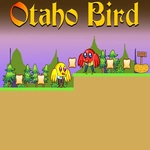
Otaho Bird looks deceptively simple until you miss the second platform by half a feather. You control a round-eyed bird hopping across a series of floating ledges, and movement is tight but demands respect. I spent my first few runs falling into the void because I didn't realize the double jump isn't just for extra height—it's a mid-air correction tool. Press W or Up twice and you can redirect your trajectory enough to save a botched leap. That little mechanic turned my frustration into flow state.
The visuals are clean pixel art, nothing flashy, but the background shifts subtly as you advance, and the bird has just enough squash-and-stretch to feel alive. There's no combat, no timers, no gimmicks—just precision platforming and a quiet sense of exploration. The levels are short, which keeps deaths from feeling too punishing, but later sections add moving platforms and one-way drops that force you to plan routes rather than spam jumps. I kept telling myself 'one more attempt' until thirty minutes vanished.
If you enjoy games like Celeste or old-school browser platformers, Otaho Bird scratches that same itch. It won't hold your hand, but it never feels unfair. The controls are responsive, the double jump has real weight, and every successful landing gives a tiny dopamine hit. Just be ready to lose a few lives learning the rhythm.
👥How to Play Otaho Bird
Use "WASD" or "Arrow" keys for the player's movement.
Use "W" or "Up" arrow key twice for double jump.
✨Game Tips
Treat the double jump as a recovery move, not just a height boost—tap it after leaving a platform to fix your arc.
Look ahead before committing to a jump; moving platforms are telegraphed by faint pixel outlines.
Don't hold the movement key while airborne if you need a precise landing—release and use short taps.
Falling is not a fail state, but re-climbing costs time; aim for the highest safe ledge first.
The game saves your progress automatically at the start of each new screen, so explore side paths without fear.
🔧FAQ
Q: Is Otaho Bird free to play?
A: Yes, it's completely free in your browser with no in-game purchases.
Q: Can I play Otaho Bird on mobile?
A: It works best with a keyboard, so a desktop or laptop is recommended.
Q: Do I need to download anything to play Otaho Bird?
A: No downloads required—just open the page and the game loads instantly.
Q: What are the controls for Otaho Bird?
A: Use WASD or Arrow keys to move, and press W or Up arrow twice for a double jump.
Q: How difficult is Otaho Bird?
A: Moderately challenging. The double jump takes practice, but levels are short and restarts are quick.
Q: Does Otaho Bird remember my progress?
A: Progress is saved automatically on each new screen, but closing the tab may reset your current run.