
Princess Skin Doctor
Play Count0
Published2021-03-23
Supported DevicesPC
CategoryKids & Educational
Rating★★★★★5.0Rate this game
📝Princess Skin Doctor Overview
A royal lineup of itchy, spotty princesses needs your steady hand—can you diagnose their skin troubles and get them glowing again?
💬What is Princess Skin Doctor?
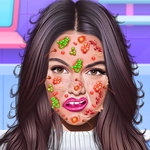
Look, I know what you're thinking: another princess game where you just dab sparkles on a tiara. But Princess Skin Doctor actually surprised me. Each patient rolls in with something different—a rash, a cluster of pimples, an angry sunburn, even a weird fungal patch that made me double take. You get a tray of tools and lotions, and it's up to you to figure out which order actually works. I spent a solid minute squirting antiseptic on a dry patch before I realized I was supposed to exfoliate first. The princess in question gave me the most withering pixel stare.
What makes it weirdly satisfying is the cause-and-effect logic. You clean the area, apply the right cream, then wait—and the blemish slowly fades or the redness calms down. If you use the wrong product, the princess flinches or the skin turns worse, which is a nice touch. It's not gory or scary, just a gentle medical sim for younger kids. The animations are soft and bubbly, like a Saturday morning cartoon. I kept coming back to see if the next patient had something new, and yes, the strawberry allergy case was genuinely amusing.
One thing that could trip you up: the magnifying glass. It zooms in on tiny spots you'd normally miss, but you have to actually click it before you can see them. If you skip that step, you'll be searching the princess's cheek for a bump that isn't visible. Also, the final moisturizer step isn't optional—I thought I was done, clicked the done button, and the game gave me a sad little 'not yet' chime. So yeah, it teaches you to finish the whole routine. For a free browser game, it's surprisingly thorough, and the princesses don't talk too much, which is a blessing.
👥How to Play Princess Skin Doctor
Use mouse to control
✨Game Tips
Start with the magnifying glass on every patient—it reveals hidden blemishes you can't see at normal zoom.
The order matters: clean the area first, then medicated cream, then moisturizer. Skip cleaning and the rash won't budge.
Watch the princess's expression. If she frowns when you apply something, undo and try a different tool quickly.
Some rashes need two rounds of the same cream, not one—don't rush to the next step if a red patch remains.
Use the cotton swab for small spots and the roller for large areas; swapping them around wastes time but doesn't hurt.
🔧FAQ
Q: Is Princess Skin Doctor free to play?
A: Yes, completely free—no hidden charges or in-game purchases.
Q: Can I play Princess Skin Doctor on mobile?
A: Yes, it runs in any browser on phones and tablets with touch controls.
Q: Do I need to download anything to start?
A: No download needed; it loads instantly as long as you have an internet connection.
Q: What age group is this game for?
A: It's designed for younger kids, around 4 to 10, but anyone can enjoy the simple care gameplay.
Q: Why won't the princess's skin heal?
A: Make sure you're using the right product for the specific condition—cleanser, medicated cream, and moisturizer in that order.
Q: Can I skip the magnifying glass step?
A: You can, but you'll miss hidden spots that prevent the level from completing. Always magnify first.