
Rolling Blocks
Play Count0
Published2022-11-23
Supported DevicesPC + Mobile
CategoryAdventure & RPG
Rating★★★★★5.0Rate this game
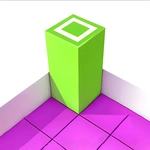
📝Rolling Blocks Overview
Tumble a stubborn block across a floating 3D grid and nail the exact landing spot before your moves run out.
💬What is Rolling Blocks?
Rolling Blocks is one of those deceptively simple 3D puzzles that makes you feel smart one second and completely lost the next. You've got a rectangular block on a grid platform, and your only job is to flip it from point A to point B so it lands in the marked target. But here's the catch: every tumble counts, and the block's proportions mean a single wrong orientation leaves you stuck hanging off the edge.
The real brain-bender kicks in when you start planning multiple moves ahead. I remember a level where I kept inching toward the goal only to realize my block was lying flat when it needed to stand on its end. That tiny shift in center of gravity changes everything—one roll can be safe, the next sends you tumbling into the void. It's like mental Tetris with a three-dimensional twist.
There are no timers or enemies, just you, the block, and a clean grid. Controls are just the arrow keys (or WASD if you prefer), which keeps it accessible even when the puzzles get vicious. It's the kind of game I'd hand to someone who claims they don't like puzzle games—five minutes later they're muttering "one more try."
👥How to Play Rolling Blocks
There is no need for any additional control operation. We need to control the direction of the box turning.
We need to make a series of plans according to the task requirements in the game, and finally complete various flipping tasks in a planned w
✨Game Tips
Count your flips before moving—the block's shape changes orientation every time.
Don't just head toward the goal; line up your final standing position first.
Use the grid edges as safety rails when you're one roll from falling.
If a path looks too short to work, try flipping the block sideways before going forward.
Restart is instant, so don't be precious about an early mistake.
Watch how the block shifts after each move because the center of gravity moves with it.
🔧FAQ
Q: Is Rolling Blocks free to play?
A: Yes, it's completely free in your browser with no payment required.
Q: Do I need to download Rolling Blocks?
A: No download needed. It runs directly in any modern web browser using HTML5.
Q: Can I play Rolling Blocks on my phone?
A: Yes, it works on mobile browsers, though arrow keys are easier on a computer.
Q: What are the controls for Rolling Blocks?
A: Use the arrow keys or WASD to flip the block in four directions.
Q: Is Rolling Blocks unblocked at school?
A: Yes, this unblocked version is designed to bypass typical school network filters.
Q: Does Rolling Blocks save my progress?
A: Progress saves locally in your browser, so you can continue where you left off.