
RX7 Drift 3D
Play Count0
Published2019-11-25
Supported DevicesPC
CategoryAdventure & RPG
Rating★★★★★5.0Rate this game
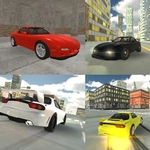
📝RX7 Drift 3D Overview
Slide a rotary-powered RX7 around tight corners, feather the handbrake, and chain impossible drift angles without spinning into the walls.
💬What is RX7 Drift 3D?
RX7 Drift 3D is one of those browser games that surprises you with how much it gets right about weight transfer. You're not just holding the gas and hoping; you're balancing throttle against steering angle, tapping the handbrake to kick the rear out, and then easing off to hold the slide. The RX7 feels properly rear-happy but controllable once you learn its rhythm. I spent my first few runs oversteering into barriers, then something clicked: short countersteer inputs, not full lock.
The slow-motion toggle (G) isn't a gimmick either. Hitting it mid-drift lets you correct mistakes you'd never catch at full speed, and the replays you record (R starts, P plays) feel like tiny highlight reels. The map is sparse but functional—enough obstacles to make you respect your line without cluttering the drift flow. The lights (L) work for night runs, and the indicators (Q, E, Z) are pure style. I flick the left one on before a big left-hand sweeper every time.
I keep coming back for five-minute sessions between study breaks. It's not a deep sim, but the core loop—start a drift, hold it, link the next corner—is absurdly satisfying. Spacebar is your initiation tool, but once you're sideways, modulate the throttle instead of yanking the wheel. Short taps, not holds. That's the difference between a clean chain and a wall kiss. The car reacts instantly to steering input, so small corrections go a long way; overcorrecting sends you into a tank-slapper.
👥How to Play RX7 Drift 3D
Arrow-Keys or WASD = Drive
Spacebar = Handbrake
G = Toggle Slow-motion
L = Turn on Lights
Q, E and Z = Turn on Indicators
R = Record gameplay
P = Play your Recorded gameplay
✨Game Tips
Tap the handbrake just before turn-in, don't hold it
Countersteer in short pulses rather than full lock
Use slow-mo (G) to practice catch transitions
Record a clean run and watch the replay to spot bad inputs
The indicators are cosmetic but fun for style clips
Lights (L) help with depth perception on night runs
🔧FAQ
Q: Is RX7 Drift 3D free to play?
A: Yes, it's completely free in your browser with no paywalls or ads interrupting the drift.
Q: Can I play RX7 Drift 3D on mobile?
A: The game uses keyboard controls, so it works best on a desktop or laptop with a physical keyboard.
Q: Do I need to download anything?
A: No downloads. It runs directly in your web browser as an HTML5 game.
Q: What are the controls for RX7 Drift 3D?
A: Arrow keys or WASD drive, Spacebar is the handbrake, G toggles slow-mo, L turns on lights, and Q/E/Z activate indicators.
Q: Is RX7 Drift 3D unblocked at school?
A: Since it's a browser game on an unblocked games site, it usually bypasses school filters, but network policies vary.
Q: Can I record my gameplay in RX7 Drift 3D?
A: Yes, press R to start recording and P to play back your recorded run, perfect for spotting mistakes or sharing clips.