
School Bus 3D Parking
Play Count0
Published2022-01-27
Supported DevicesPC + Mobile
CategoryAdventure & RPG
Rating★★★★★5.0Rate this game
📝School Bus 3D Parking Overview
Squeeze a lumbering yellow school bus into impossibly tight painted bays without scraping a single cone or barrier.
💬What is School Bus 3D Parking?
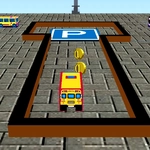
Parking a school bus is nothing like parking a hatchback. The thing is long, wide, and turns like a boat in a canal. School Bus 3D Parking leans into that reality: you'll swing a full-size yellow bus through cones, around pillars, and into painted bays that feel about two inches wider than the vehicle. The 3D camera sits low and close to the back, so your side mirrors and rear wheels become your only real friends.
Level four is where I finally learned to stop rushing. I had the rear axle lined up perfectly, gave it a little too much gas, and watched the front bumper clip a cone I'd completely forgotten about. That's the game's whole personality: it punishes overconfidence but never feels unfair. Tap the brake, ease off the arrow key, and the bus responds with this heavy, believable weight that makes every successful park feel earned. There's no timer on most levels, so you can breathe, check your angle, and creep in.
On desktop, the arrow keys do exactly what you'd expect: up for gas, down for reverse, left and right to steer. On mobile, the same functions appear as big touch buttons. No download, no sign-up, just a browser tab. It's a straightforward skill game, but the challenge ramps up nicely without ever becoming a rage-fest. If you want to feel like a bus driver with zero CDL pressure, this is oddly satisfying.
👥How to Play School Bus 3D Parking
Arrow keys or tap on the buttons.
✨Game Tips
Creep forward with light taps on the accelerator; full throttle makes rear swings uncontrollable.
Check the front left corner constantly—the bus nose travels wider than the rear.
Reverse into the bay instead of pulling in headfirst; it's easier to correct mid-maneuver.
Use the camera's low angle to spot the painted line under your side mirror before stopping.
If you oversteer, stop completely and straighten the wheel before trying to fix it.
🔧FAQ
Q: Is School Bus 3D Parking free?
A: Yes, it's completely free to play in your browser with no hidden payments.
Q: Can I play School Bus 3D Parking on mobile?
A: Yes, the touch buttons work on phones and tablets; the game runs in any modern mobile browser.
Q: Do I need to download anything?
A: No download needed. It loads directly in your web browser as an HTML5 game.
Q: What are the controls?
A: Use arrow keys on a keyboard or tap the on-screen buttons to steer, accelerate, and reverse.
Q: Does the game save my progress?
A: Progress may not save between sessions, but you can replay levels anytime you like.
Q: Is School Bus 3D Parking suitable for kids?
A: Yes, it's a family-friendly parking game with no violence or inappropriate content.