
Sliding Tim: Way to home
Play Count0
Published2023-09-22
Supported DevicesPC
CategoryAdventure & RPG
Rating★★★★★5.0Rate this game
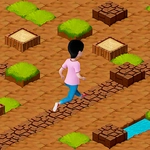
📝Sliding Tim: Way to home Overview
Can you stop Tim at his front door when the floor is basically polished ice? Press to run, release to stop—but he keeps sliding.
💬What is Sliding Tim: Way to home?
Sliding Tim: Way to home is a one-button momentum puzzle disguised as a platformer. You press space (or click) to make Tim run, release to stop him—but Tim doesn't stop. He slides, skids, and sometimes overshoots the exact spot you were aiming for by a frustrating but fair distance. That's the whole hook, and it's surprisingly tense. I lost count of how many times I watched Tim coast right past the front door and into a bottomless gap because I released a fraction too late.
The challenge isn't raw speed or reflexes; it's learning the slide distance by feel. Early levels lull you into thinking you can time it visually, but soon you're counting pixels of momentum and releasing before Tim even reaches the edge. There's a moment—somewhere around level six or seven—where you finally stop fighting the controls and start riding the slide. That's when it clicks. You stop seeing the button as a brake and start using it as a throttle, feathering short bursts to nudge Tim forward.
It won't win any awards for graphics, but the physics feel consistent, and each level adds just enough variation (longer slides, tighter platforms, a few moving hazards) to keep you retrying. If you want a game that treats stopping as the main skill, this is a satisfying time-waster. I'd recommend a mouse over the spacebar if you're playing for a while—your finger will thank you.
👥How to Play Sliding Tim: Way to home
Press the spacebar to make the player start running, and release when needed to stop the player from running.
You can also use the LMB instead of the space bar.
✨Game Tips
• Feather the spacebar instead of holding it down—short bursts give you finer control over Tim's position.
• Release earlier than feels natural; Tim's slide adds extra distance after you let go.
• If you overshoot, reset immediately rather than trying to correct mid-slide—recovery is usually impossible.
• Use the mouse click as a backup if your spacebar finger gets tired during longer sessions.
• Watch the edge or landing spot, not Tim himself, when timing your release.
• Practice the first few levels until the stopping distance becomes second nature.
🔧FAQ
Q: Is Sliding Tim: Way to home free?
A: Yes, it's completely free to play in your browser.
Q: Can I play Sliding Tim: Way to home on mobile?
A: The game works on touch screens; tap anywhere to run, release to stop.
Q: Do I need to download anything?
A: No download or install needed—it runs directly in your web browser.
Q: What are the controls?
A: Press spacebar or left mouse button to run, release to stop.
Q: Is there a way to restart a level quickly?
A: Most levels reset automatically when you fall, or press R if available.
Q: Does the game save my progress?
A: Progress may not save between sessions, so complete levels in one sitting.