
Slow Down Cool
Play Count0
Published2022-09-12
Supported DevicesPC + Mobile
CategoryAdventure & RPG
Rating★★★★★5.0Rate this game
📝Slow Down Cool Overview
You've got two legs on screen and a long way to go—just don't trip over your own feet in Slow Down Cool, where every step is a balancing act.
💬What is Slow Down Cool?
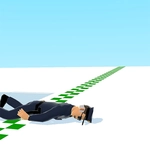
Slow Down Cool drops you into a 3D world where your avatar's legs are the only things you control. There's a button for the left foot, a button for the right foot, and if you mash them like it's a sprint you'll end up eating virtual pavement. I learned that the hard way about ten seconds in. The game doesn't tell you to slow down for no reason—your character's balance is tied to how deliberately you alternate steps. One wrong tap and the whole body tilts, wobbles, and then you're staring at the sky.
The real hook is that walking isn't automatic. You have to think about weight transfer, timing, and rhythm almost like you're learning to walk again. There's something weirdly satisfying about finally getting a steady stride going, left-right-left-right, watching the distance markers tick by. Then you get cocky, try to speed up, and your legs tangle like spaghetti. It's not a hard game to understand, but it punishes impatience in the funniest way.
I kept coming back just to see if I could beat my own longest walk without falling. It's the kind of silly challenge that eats an afternoon. No story, no enemies—just you, your legs, and a very long path. If you like games that test coordination and make you laugh at yourself, this one's a keeper.
👥How to Play Slow Down Cool
Players can enter the game screen by clicking the button on the right of the selection interface.
The left and right legs of the player are displayed on the left and lower sides of the interface respectively, and the player needs to control the movement
✨Game Tips
Tap one leg at a time, never both together—your balance resets with each clean step.
Watch the body lean; if it starts tipping, tap the opposite leg quickly to catch yourself.
Keep a steady rhythm instead of rushing; faster taps don't mean faster movement here.
Use the edge of the path as a guide to stay straight, especially on narrow sections.
Don't panic after a stumble—pause a beat, regain balance, then resume the left-right pattern.
🔧FAQ
Q: Is Slow Down Cool free to play?
A: Yes, it's completely free in your browser with no paywall or hidden charges.
Q: Can I play Slow Down Cool on my phone?
A: Yes, the HTML5 version works on mobile browsers, though a larger screen helps with the leg controls.
Q: Do I need to download anything to play?
A: No downloads or plugins needed—just open the game page and start walking.
Q: What are the controls for Slow Down Cool?
A: You'll see buttons for each leg on screen; tap or click them alternately to move forward without falling.
Q: Is Slow Down Cool suitable for kids?
A: It's a simple, non-violent coordination game that's fine for all ages, though younger kids might find it tricky.
Q: How do I get better at Slow Down Cool?
A: Focus on rhythm rather than speed—alternate legs slowly and don't tap both at once.