
Stunt Simulator
Play Count0
Published2020-09-22
Supported DevicesPC + Mobile
CategoryAdventure & RPG
Rating★★★★★5.0Rate this game
📝Stunt Simulator Overview
Rev the engine, hit a ramp at full tilt, and see how many flips you can stick before the arena floor reminds you gravity exists.
💬What is Stunt Simulator?
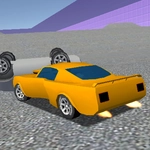
Stunt Simulator drops you behind the wheel in a large 3D arena built for doing dumb, spectacular things with a car. You drive with WASD, but the real controls are momentum and nerve. There are ramps, quarter-pipes, a giant loop, and enough open space to get properly disoriented mid-air. I spent my first five minutes just launching off the same ramp at slightly different angles to see how the suspension reacts. It bounces, it lurches, it sometimes flips backward when you gun it too hard. That unpredictability is the point.
The physics feel deliberately loose—like the car has real weight but not much patience. You'll approach a ramp, tap W a little too confidently, and suddenly you're sideways at 40 feet with the camera spinning. That's where the fun lives. You can chain simple jumps into accidental barrel rolls, or you can try to be precise: line up a landing on the downslope, counter-steer with A or D while airborne, and pray the rear bumper doesn't clip first. I once landed a full 360 off the loop's exit and immediately drove straight into a wall because I was celebrating. The game doesn't judge. It just resets the car and lets you go again.
There's no career mode or unlockables pushing you forward—just the arena and your own curiosity. That might sound thin, but it's exactly why I kept coming back. You start thinking, "What if I reverse up that ramp?" or "Can I balance on two wheels for more than two seconds?" The car deforms on hard impacts, and the crunching sound adds a nice tactile layer. If you enjoy sandbox stunt games with no pressure and plenty of ways to fail spectacularly, this one scratches that itch without pretending to be something it isn't.
👥How to Play Stunt Simulator
WASD to control car
✨Game Tips
Keep S (reverse) ready for quick repositioning before a jump; sometimes backing up gives you a straighter line.
🔧FAQ
Q: Is Stunt Simulator free?
A: Yes, it's completely free to play online with no hidden paywalls.
Q: Can I play Stunt Simulator on mobile?
A: The game works best with a keyboard, but some mobile browsers support touch controls if you tweak settings.
Q: Do I need to download anything to play Stunt Simulator?
A: No downloads needed—it runs right in your web browser on any device with HTML5 support.
Q: Does Stunt Simulator work at school or work?
A: Yes, as an unblocked game you can play it on most networks without installing software.
Q: What are the controls for Stunt Simulator?
A: Use WASD keys to drive: W for gas, S for reverse, A and D to steer left and right.
Q: How do I reset my car if it gets stuck?
A: Most stunt simulators auto-reset after a bad crash, but you can often press R or refresh the page to restart.