
Subway Batman Runner
Play Count0
Published2021-06-14
Supported DevicesPC + Mobile
CategoryAdventure & RPG
Rating★★★★★5.0Rate this game
📝Subway Batman Runner Overview
The Batmobile's in the shop, so Batman's sprinting through the subway tunnels, dodging trains and leaping over barriers in this endless runner.
💬What is Subway Batman Runner?
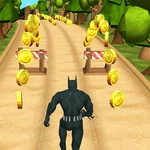
Forget the cape gliding — this Batman is stuck underground, running like mad through subway tunnels because the Batmobile broke down. You'll guide him past oncoming trains, stationary barriers, and the occasional low ceiling that demands a quick slide. The controls are dead simple: tap or click to jump, tap again for a double jump, and hold down for a slide. What makes it tick is the speed. After a few hundred meters the tunnel narrows and the obstacles start coming in twos and threes, forcing you to commit to a jump or a slide half a second before you think you're ready.
I kept coming back because of the near misses. There's a moment when a train rushes past from the opposite direction and you've got just enough room to slip between two cars — if you're a pixel off, you're a bat-shaped pancake. Collecting glowing batarangs along the track feels satisfying too, especially when you chain a jump right into a slide and scoop up an entire row of them. The game doesn't overcomplicate things with upgrades or missions; it's just you, the tunnels, and a scoreboard that dares you to beat your last run.
Visuals lean into the comic-book vibe with dark tunnels, neon signs, and Batman's silhouette cutting through the underground haze. The animation is smooth enough that every crash feels earned rather than cheap. If you've played other endless runners, you'll pick it up in seconds, but the Batman skin and the tight collision detection give it a little extra personality. Not a revolutionary game by any means, but for a quick five-minute break between classes or while you're pretending to work, it does the job better than most.
👥How to Play Subway Batman Runner
Use Mouse Or keyboard To Play
✨Game Tips
Slide under low barriers instead of jumping — sliding gives you more forward momentum and keeps your hitbox low for longer.
Collect batarangs in the air after a double jump; the timing lines up so you can clear a barrier and grab currency at the same time.
Stay in the middle lane mentally — even though there are no lanes, positioning yourself slightly left of center gives you the best reaction window for trains.
Use short hops for small gaps and save the double jump for sequences where obstacles stack close together.
Don't panic when a train horns — it's usually still a full second out, which is enough time to adjust your position if you're not already mid-air.
Practice the slide-jump combo: hit slide right before a low barrier, then immediately jump as you come out of it to clear a follow-up obstacle.
🔧FAQ
Q: Is Subway Batman Runner free to play?
A: Yes, it's completely free in your browser with no in-game purchases required.
Q: Can I play Subway Batman Runner on my phone?
A: Yes, the HTML5 version works on mobile browsers and responds to touch controls.
Q: Do I need to download anything to play?
A: No download is needed. Just open the game page and it runs instantly in any modern browser.
Q: What are the controls?
A: Click, tap, or press the spacebar to jump. Press again mid-air for a double jump. Hold down to slide.
Q: Is there a multiplayer mode in Subway Batman Runner?
A: No, this is a single-player endless runner focused on beating your own high score.
Q: How do I restart after crashing?
A: The game restarts automatically after a crash, or you can refresh the page to begin a new run immediately.