
Supra Drift 3D
Play Count0
Published2019-11-15
Supported DevicesPC
CategoryAdventure & RPG
Rating★★★★★5.0Rate this game
📝Supra Drift 3D Overview
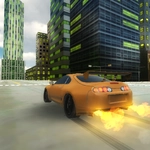
Slide a tuned Supra through neon-drenched streets, feathering the handbrake to chain smoky drifts while the city lights smear past your windows.
💬What is Supra Drift 3D?
I've thrown plenty of virtual cars around corners, but Supra Drift 3D nails the weight transfer in a way that kept me restarting runs just to nail one more corner. You're behind the wheel of a seriously quick Supra on a night map that feels like a late-night touge run. The streets are wide enough to link corners but tight enough that a bad entry will slap you into a barrier. That's where the spacebar handbrake becomes your best friend. Tap it to kick the rear out, then modulate the throttle to hold the angle. The smoke pouring off the rear tires is the kind of visual feedback that makes every drift feel earned.
What surprised me was the slow-motion toggle. Hitting G on the approach to a hairpin drops time to a crawl, letting you see exactly when to countersteer. It's not a cheat—it's a learning tool. Once you start chaining three or four corners without spinning, you'll wonder why every drift game doesn't have this. There's also a full indicator system (Q, E, Z) if you want to roleplay a clean run, and a record function that plays back your best attempts. The L key turns on headlights, and honestly, the glow against the wet-looking asphalt is a nice touch.
It's not a huge map, but that works in its favor. You learn the rhythm of the streets, find the line through the tight S-bend near the start, and chase your own ghost. The keyboard controls feel responsive without being twitchy, and the Supra has enough power to break traction on demand but enough grip to recover if you're smooth. My only gripe is that a cockpit view would have been nice, but the chase cam gets the job done. If you have ten minutes and a itch for opposite lock, this scratches it hard.
👥How to Play Supra Drift 3D
Arrow-Keys or WASD = Drive
Spacebar = Handbrake
G = Toggle Slow-motion
L = Turn on Lights
Q, E and Z = Turn on Indicators
R = Record gameplay
P = Play your Recorded gameplay
✨Game Tips
Tap the handbrake instead of holding it; a quick flick transfers weight without killing your speed.
Hit G for slow-motion right before a tight corner—it gives you time to spot the exact countersteer moment.
Use the outer loop to warm up and learn how the Supra reacts to throttle blips mid-drift.
Don't ignore the indicators; flipping one on before a drift adds a weirdly satisfying layer of commitment.
Record a clean run with R, then watch it back with P to see where you're losing angle.
Feather the throttle after initiating a drift; holding it wide open usually ends in a spin.
🔧FAQ
Q: Is Supra Drift 3D free to play?
A: Yes, it's completely free in your browser with no hidden paywalls.
Q: Can I play Supra Drift 3D on my phone?
A: The game is designed for keyboard controls, so a desktop or laptop is recommended.
Q: Do I need to download anything to play Supra Drift 3D?
A: No downloads—just open the page and the game loads instantly as an HTML5 title.
Q: How do I activate slow motion in Supra Drift 3D?
A: Press the G key while driving to toggle slow-motion on and off.
Q: Can I record my gameplay in Supra Drift 3D?
A: Yes, press R to start recording and P to play back your recorded run.
Q: What are the controls for Supra Drift 3D?
A: Arrow keys or WASD steer, Space is handbrake, G slow-mo, L lights, and Q/E/Z work the indicators.