
Tap Away 3D
Play Count0
Published2022-07-25
Supported DevicesPC + Mobile
CategoryAdventure & RPG
Rating★★★★★5.0Rate this game
📝Tap Away 3D Overview
Rotate a cube of colorful blocks and tap them away in the most satisfying puzzle loop you'll play this week.
💬What is Tap Away 3D?
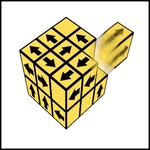
Tap Away 3D drops you in front of a floating cube made of dozens of little blocks, each one facing a specific direction. Your job sounds simple—tap a block to send it flying off the cube. But the blocks only slide out along their arrow direction, and if anything blocks the path, that block stays put. So you're constantly rotating the camera to find the right angle, scanning for blocks that are free to move. It's oddly peaceful at first, then you hit a level with a hundred blocks and realize you need a plan.
The rotation is the whole game. Drag anywhere to spin the cube, and the physics feel immediate—blocks wobble slightly as you turn, arrows glow when a block becomes eligible. I kept getting tripped up by blocks hidden on the back face; you'll learn to rotate a full 360 before making any move. Some puzzles have locks or chains that force a sequence, so you can't just tap randomly. That's where the 'aha' moment hits: you spot a chain reaction, tap the right block, and half the cube cascades away in a shower of color. It's the kind of small payoff that makes you restart a level just to see it again.
For a free browser game, Tap Away 3D is absurdly polished. Menu is minimal, no energy system, no forced ads between every level. The 3D art is clean, pastel blocks with soft shadows, and the sound effects are subtle but satisfying. I'd call it a thinking person's fidget toy—easy to pick up for two minutes, harder to put down when you're one block from clearing the board.
👥How to Play Tap Away 3D
touch or click block for remove it
drag for rotate camera
✨Game Tips
Rotate the cube fully before tapping; blocks on the back are easy to miss and often the key to unlocking a level.
Look for blocks with no obstructions in their arrow direction—tapping those first clears space for the rest.
Some levels have linked blocks or chains; figure out the sequence before you start tapping randomly.
If you get stuck, there's no undo, so restart the level instead of wasting taps on blocked blocks.
Use small, quick drags to rotate precisely—big swipes can overshoot and make you lose your orientation.
🔧FAQ
Q: Is Tap Away 3D free to play?
A: Yes, the game is completely free online with no hidden fees or downloads.
Q: Can I play Tap Away 3D on my phone?
A: It works in mobile browsers with touch controls; just tap and drag to rotate.
Q: Do I need to download anything?
A: No download is required—it runs directly in your browser as an HTML5 game.
Q: How do I rotate the cube?
A: Drag anywhere on the screen with your mouse or finger to spin the camera around the cube.
Q: Why won't some blocks move when I tap them?
A: Blocks only slide in their arrow direction, so another block or the cube's structure may be blocking them.
Q: What if I get stuck on a level?
A: There's no penalty for restarting, so reload the level and try a different tapping order.