
Tinto
Play Count0
Published2022-02-09
Supported DevicesPC + Mobile
CategoryAdventure & RPG
Rating★★★★★5.0Rate this game
📝Tinto Overview
Can you chain double jumps through crumbling ledges and spike pits? Tinto gives you exactly two leaps per airtime, so every button press counts.
💬What is Tinto?
Tinto is a lean, no-nonsense platformer that trusts you to figure out its rhythm. You move with WASD or the arrow keys, and pressing W or Up again mid-air gives you that crucial double jump. That second jump isn't a safety net — it's your main tool for clearing wide gaps, correcting bad landings, and reaching ledges that look just out of range. The levels don't hold your hand. You'll misjudge a gap, tap jump a fraction too late, and watch your character tumble into the void. Restart is instant, so the sting fades fast.
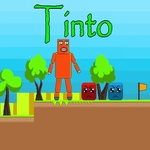
The visual style is simple but readable: solid platforms, clear hazards, and a main character that responds exactly when you expect. I kept coming back to one early section where a moving platform passes under a spiked ceiling — you have to double jump off the platform at the peak, not after it starts dropping. That's the kind of micro-timing Tinto rewards. There's no combat, no inventory, just pure traversal. Some hidden paths only open up if you use the double jump to reach a high wall or side nook, so poking around feels worth it.
If you're playing on a laptop keyboard, be ready for some cramping — the double tap on W or Up can be less forgiving than a dedicated jump button. But that's part of the charm. It's the kind of game you can lose twenty minutes to without noticing. No story text, no cutscenes, just you, gravity, and a double jump that refuses to let you cheat.
👥How to Play Tinto
Use WASD or Arrow keys for the player's movement.
Use "W" or "Up" arrow key twice for double jump.
✨Game Tips
- Master the double jump early: press W or Up twice in quick succession, not at the apex, to maximize height.
- Use the second jump to correct landing mistakes — save it until you see where you'll land.
- Short hops with a single tap are often safer than full jumps on narrow platforms.
- Look for high ledges and hidden nooks; the double jump opens optional routes with fewer hazards.
- Don't hold the movement key when you land on a small platform; release briefly to avoid sliding off.
- If a gap looks too wide, try double jumping from the very edge rather than the middle.
🔧FAQ
Q: Is Tinto free to play?
A: Yes, Tinto is completely free in your browser. No payment or account needed.
Q: Do I need to download anything to play Tinto?
A: No downloads. It runs directly in your browser with HTML5.
Q: Can I play Tinto on mobile or tablet?
A: Tinto works best with a keyboard. Touch controls may be limited for double jumps.
Q: What are the controls in Tinto?
A: Use WASD or arrow keys to move. Press W or Up twice in mid-air to double jump.
Q: Is Tinto hard?
A: Some sections require precise timing, but checkpoints and instant restarts keep it fair.
Q: Can I play Tinto offline?
A: You need an internet connection to load the game. After loading, some browsers may allow offline play.