
Weight Puzzle 3D
Play Count0
Published2024-08-16
Supported DevicesPC + Mobile
CategoryAdventure & RPG
Rating★★★★★5.0Rate this game
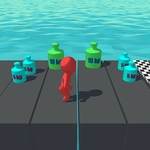
📝Weight Puzzle 3D Overview
Drop, stack, and balance your way through 100+ tricky 3D levels in Weight Puzzle 3D, where a single misplaced block can send the whole tower crashing.
💬What is Weight Puzzle 3D?
I'll admit, I went into Weight Puzzle 3D expecting a lazy mobile port. Three levels later I was muttering 'just one more' at my screen. The premise is stripped to the bone: you've got a platform or a beam, a pile of blocks with different weights, and a target that flips, tilts, or balances. Your job is to tap the right blocks in the right order so the whole contraption settles exactly where it needs to. That's it. But the physics are honest — a heavy cube dropped from two millimeters too high can bounce, and a light sphere wedged into the corner can save your entire run.
What surprised me was how tactile the clicking feels. On a touchscreen you're literally flicking blocks aside, while on desktop the mouse click has a satisfying snap. The 3D camera pivots smoothly, so you can eyeball the stack from every angle before committing. Some puzzles look impossible until you notice that one block's shadow is slightly darker, hinting at more mass. Then it clicks. I kept coming back because failure never feels cheap — every collapse is your fault, and every solution feels earned. (Okay, I did rage-quit twice on the later levels, but that's on me.) If you like thinking puzzles that respect your intelligence, give this one fifteen minutes. It'll hook you.
👥How to Play Weight Puzzle 3D
Mouse click or tap to play
✨Game Tips
Put the heaviest block down first whenever you can; it stabilizes the base and prevents tipping early.
Tap lighter blocks near the edges for fine adjustments — they won't send the structure flying.
If the level has a balance meter, watch it after each move to see which side is still too heavy.
Don't restart immediately after a collapse; study where the stack broke because that shows the weak point.
Use the camera angles to check for hidden overhangs or overlapping blocks that look solid but aren't.
🔧FAQ
Q: Is Weight Puzzle 3D free to play?
A: Yes, it's completely free in your browser with no hidden fees or paywalls.
Q: Can I play Weight Puzzle 3D on mobile?
A: Absolutely. The game supports touch controls, so it works great on phones and tablets.
Q: Do I need to download anything to play?
A: No downloads needed. Just open the game page and start clicking or tapping.
Q: What if the game loads slowly?
A: Refresh the page or close other tabs to free up memory. It runs on HTML5 and should load quickly.
Q: Are there any in-game ads?
A: There may be occasional ads between levels, but they don't interrupt gameplay.
Q: How do I reset a level in Weight Puzzle 3D?
A: Look for a reset or restart button on screen; if not, refreshing the page starts the level over.