
Woodturning Art
Play Count0
Published2021-02-09
Supported DevicesPC
CategoryAdventure & RPG
Rating★★★★★5.0Rate this game
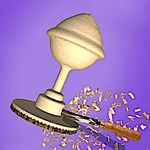
📝Woodturning Art Overview
Spin a raw log, angle the chisel, and shave away everything that isn't a gorgeous wooden bowl. Your mouse is the lathe — steady hands win.
💬What is Woodturning Art?
Woodturning Art is the kind of game that tricks you into thinking you're learning a real craft. You start with a plain cylinder of wood clamped onto a lathe, spinning fast enough to hum. Hold the mouse steady and press the chisel against the grain — shavings curl off in these tiny satisfying ribbons. The first few attempts? Yeah, my bowl looked like a crushed soda can. But then you find the sweet spot: light pressure, smooth horizontal movements, and the profile starts to curve exactly how you drew it in your head.
What got me hooked was the finishing stage. After shaping, you sand the surface until it's buttery smooth, then pick a stain or paint. Watching the grain darken under a coat of walnut stain is weirdly meditative. There's no timer, no score chasing you, just you, the wood, and the hum of the lathe. You can rotate the camera around your piece, zoom in to check for nicks, and fix them with another pass. It's the kind of game you open for five minutes and look up an hour later.
Don't expect explosions or boss fights. This is for when you want to zone out but still feel productive. The mouse is your only tool, so a decent optical mouse helps; a trackpad will make you want to throw your laptop. Start with the requested shapes to unlock more wood types, and resist the urge to remove too much material in one go — the game will happily let you turn a bowl into a splintered mess. Trust me on that.
👥How to Play Woodturning Art
Game Played with MOUSE.
✨Game Tips
Keep your chisel tip just touching the surface; pressing harder removes material faster but leaves gouges.
Use smooth, slow horizontal movements to avoid wavy ridges.
Sand after shaping to eliminate tool marks before applying stain.
Rotate the camera often to spot uneven spots hiding on the back.
If the wood starts shaking, you're pushing too hard — lift off and restart the pass.
Unlock different wood types by completing orders; each has its own grain pattern.
🔧FAQ
Q: Is Woodturning Art free to play?
A: Yes, it's completely free in your browser — no hidden charges or premium unlocks.
Q: Do I need to download anything?
A: No download needed. It runs in your browser using HTML5, just click and start carving.
Q: Can I play Woodturning Art on mobile?
A: Yes, it supports touch controls, but a mouse gives you much finer control over the chisel.
Q: Is there a tutorial?
A: The first few levels act as a tutorial, showing you where to place the chisel and how to shape.
Q: What if I accidentally ruin a piece?
A: You can restart any piece from the main menu without losing overall progress or unlocked wood types.
Q: How do I unlock new wood types?
A: Complete the requests from customers to earn coins and unlock different woods like walnut, cherry, or maple.