
Yuas Quest 2
Play Count0
Published2023-01-24
Supported DevicesPC + Mobile
CategoryAdventure & RPG
Rating★★★★★5.0Rate this game
📝Yuas Quest 2 Overview
Chain double jumps, dodge spike pits, and pray you land on the next ledge — Yuas Quest 2 is a tight platforming gauntlet where every pixel of air control matters.
💬What is Yuas Quest 2?
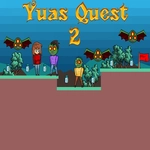
Look, this isn't one of those chill adventure games where you wander around picking up trinkets. Yuas Quest 2 drops you into a side-scrolling gauntlet of crumbling platforms, spike-lined corridors, and jumps that feel designed by someone who wants you to fail. You move with WASD or the arrow keys, and that double jump on W/Up is your lifeline — but only if you time the second press properly. Mash it too early and you'll stall out in midair, then drop straight into a pit. Ask me how I know.
The level design leans hard into precision platforming. Each screen feels like a puzzle where the solution is always "be better at jumping." There are checkpoints, mercifully, but they're spaced far enough apart that you'll learn the rhythm of each section rather than brute-forcing it. I kept coming back to one stretch with three moving platforms over a spike floor. The key I finally worked out: hold forward while double jumping, but release the key right before landing to avoid sliding off the edge. That tiny adjustment made the difference between 20 deaths and a clean run.
It's not a long game, but it doesn't need to be. The challenge is the point. If you enjoy games like Celeste or N+ but want something you can play in a browser during a break, this scratches that itch. Just don't expect any hand-holding — Yuas Quest 2 respects your time by making you earn every inch of progress, one double jump at a time.
👥How to Play Yuas Quest 2
Use "WASD" or "Arrow" keys for the player's movement.
Use "W" or "Up" arrow key twice for double jump.
✨Game Tips
- Wait until the peak of your first jump before hitting the double jump key — you'll get more height and distance.
- Release movement just before landing on small platforms to stop yourself from sliding off.
- Use checkpoints to practice the next tough jump without losing all your progress.
- Memorize spike patterns rather than reacting; they're on a fixed loop.
- Don't hold jump — a quick tap gives you more control than a long press in tight corridors.
- If you keep dying on a gap, try approaching from a different angle or slightly later jump timing.
🔧FAQ
Q: Is Yuas Quest 2 free to play?
A: Yes, it's completely free in your browser with no hidden costs.
Q: Can I play Yuas Quest 2 on mobile?
A: Touch controls work, but a keyboard is strongly recommended for precision jumps.
Q: Do I need to download anything to play Yuas Quest 2?
A: No downloads or installs needed — just open the page and start playing.
Q: What are the controls for Yuas Quest 2?
A: Use WASD or arrow keys to move, and press W or Up arrow twice for a double jump.
Q: Is Yuas Quest 2 unblocked at school?
A: It runs on HTML5 and usually works on school networks, but some filters may block game sites.
Q: How long does Yuas Quest 2 take to finish?
A: Most players finish in 15-30 minutes, but perfecting every jump can take much longer.