
Zombie Vacation
Play Count0
Published2020-09-25
Supported DevicesPC
CategoryAdventure & RPG
Rating★★★★★5.0Rate this game
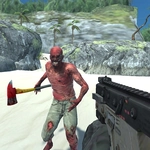
📝Zombie Vacation Overview
The brochure promised sun, sand, and cocktails. Instead, you got shambling hordes and a pistol with your name on it. Time to earn that tan.
💬What is Zombie Vacation?
I've played a lot of zombie games, but Zombie Vacation nails that specific 'wrong place, wrong time' energy. You spawn on a sunny coastal resort—think palm trees, beach umbrellas, an empty pool with a suspicious red stain—and within seconds the undead start shambling out from behind tiki bars and beach chairs. Movement feels loose and arcadey: WASD to run, space to hop over low walls or onto deck chairs, left mouse to fire whatever weapon you've scavenged. The reload is manual (R), which sounds like a chore until you're backpedaling from three zombies and realize you've got two bullets left. That's when the panic kicks in.
The 3D world isn't huge, but it's dense with details that make you feel like you're fighting through a canceled all-inclusive. I kept catching myself using the environment—jumping onto a poolside bar to buy a few seconds, shooting explosive barrels near a buffet table, kiting enemies around a beached boat. There's no auto-save or checkpoint spam; when you die, you restart the wave with your earlier gear. The stakes are just right. You'll learn the zombie types quickly: the slow shamblers are easy headshots, but the sprinting ones in Hawaiian shirts? They ruin your day if you don't see them coming.
Pause (P) is your friend, especially when you need to check ammo or just breathe. The game doesn't hold your hand—no tutorial beyond a brief prompt—so your first run will probably end in a messy pile of limbs. Mine did. But by the third attempt I was clearing corners, timing jumps over fences, and treating every reload like a mini-boss fight. If you want a zombie shooter that feels like a summer vacation gone horribly wrong, this one's a surprisingly good time.
👥How to Play Zombie Vacation
WASD - Move. LMB - Shoot. R - Reload. P - Pause. Space - Jump.
✨Game Tips
Keep moving backwards while reloading—never stand still unless you're on a roof or behind a locked gate.
Use Space to hop onto pool loungers or low walls; zombies have to path around, buying you a couple seconds.
Aim for headshots on shamblers to conserve ammo, but mag-dump the sprinters without shame.
Listen for audio cues: growls get louder right before a zombie lunges from behind a tiki bar.
Pause with P when your hands get shaky; check your ammo and plan the next kite route.
Don't ignore explosive barrels—especially near the buffet area. One shot clears a whole group.
🔧FAQ
Q: Is Zombie Vacation free to play?
A: Yes, it's a free browser game. No payment or account needed.
Q: Can I play Zombie Vacation on my phone?
A: It's designed for keyboard and mouse, so mobile touch controls aren't supported. Best on desktop.
Q: Do I need to download anything?
A: No download required. It runs in your browser as an HTML5 game.
Q: What are the controls for Zombie Vacation?
A: WASD to move, left click to shoot, R to reload, Space to jump, P to pause.
Q: Does the game save my progress?
A: No persistent saves. You restart the wave from the beginning when you die.
Q: Is there a way to make the game easier?
A: Keep moving and use high ground. Memorize zombie spawn points after a few runs.